How-To Build Your First MCP Server with PyCharm #
In this video, I’m going to show you how to wrap any APIs into a MCP Server, and then test it with Claude Desktop and Postman. Github: https://github.com/portkeys/nasa-mcp
🎯 What You’ll Learn #
By the end of this guide, you’ll know how to:
Use FastMCP for rapid MCP server development
Configure Claude Desktop to use custom MCP servers
Test Python MCP servers with both Claude and Postman
Leverage PyCharm’s AI Assistant for enhanced development
🚀 What We’re Building #
We’ll create an MCP server that wraps two powerful NASA APIs:
Astronomy Picture of the Day (APOD) - Get stunning space imagery with detailed descriptions
NASA Image and Video Library - Search through NASA’s vast collection of space media
Four-step Plan
Step 1: Project Setup with UV Package Manager #
First, let’s set up our project with UV, a modern Python package manager that’s faster and more reliable than pip.
Installing Dependencies #
uv add requests python-dotenv mcpEnvironment Configuration #
Create a .env file in your project root:
NASA_API_KEY=your_nasa_api_key_hereThis approach keeps sensitive API keys out of your source code and makes your project more secure and portable.
Step 2: API Development & Testing #
Now we’ll create our NASA API functions.
Create a new file nasa_api/nasa.py:
import os
from dotenv import load_dotenv
import requests
from typing import Optional, Dict

load_dotenv()

NASA_API_KEY = os.getenv("NASA_API_KEY") or "DEMO_KEY"

def make_api_request(url: str, params: dict, timeout: int = 10) -> Optional:
    """
    Make an HTTP GET request to the specified URL with given parameters.

    Args:
        url (str): The URL to make the request to
        params (dict): Dictionary of parameters to include in the request
        timeout (int, optional): Request timeout in seconds. Defaults to 10.

    Returns:
        Optional: JSON response as a dictionary if successful, None if failed

    Raises:
        Prints error message to console if request fails
    """
    try:
        response = requests.get(url, params=params, timeout=timeout)

        # Check if the response status code indicates success
        response.raise_for_status()

        # Try to parse JSON response
        return response.json()

    except requests.exceptions.Timeout:
        print(f"Request timeout after {timeout} seconds for URL: {url}")
        return None

    except requests.exceptions.ConnectionError:
        print(f"Connection error occurred for URL: {url}")
        return None

    except requests.exceptions.HTTPError as e:
        print(f"HTTP error {response.status_code} for URL: {url} - {e}")
        return None

    except requests.exceptions.RequestException as e:
        print(f"Request error for URL: {url} - {e}")
        return None

    except ValueError as e:
        print(f"JSON decode error for URL: {url} - Invalid JSON response: {e}")
        return None

    except Exception as e:
        print(f"Unexpected error for URL: {url} - {e}")
        return None

def get_nasa_apod(date: Optional = None):
    """
    Retrieve NASA's Astronomy Picture of the Day (APOD).

    Args:
        api_key (str, optional): NASA API key. Defaults to NASA_API_KEY from environment.
        date (Optional, optional): Date in YYYY-MM-DD format for specific APOD.
                                       If None, returns today's APOD. Defaults to None.

    Returns:
        Optional: Dictionary containing APOD data including title, explanation,
                       image URL, and other metadata. Returns None if request fails.

    Example:
       apod = get_nasa_apod(date="2023-01-01")
       print(apod)
    """
    # Build API URL and parameters
    base_url = "https://api.nasa.gov/planetary/apod"
    params = {
        "api_key": NASA_API_KEY,
    }

    if date:
        #
        params = date

    return make_api_request(base_url, params, timeout=10)

def search_nasa_images(query: str,
                       size: int = 3) -> Optional:
    """
    Search NASA's Image and Video Library for images matching the query.

    Args:
        query (str): Search term to look for in NASA's image library
        size (int, optional): Number of results to return (page size). Defaults to 3.

    Returns:
        Optional: Dictionary containing search results with image metadata,
                       URLs, and descriptions. Returns None if request fails.

    Example:
        results = search_nasa_images("Mars rover", size=5)
        for item in results:
        print(item)
    """
    # NASA Image and Video Library API endpoint
    base_url = "https://images-api.nasa.gov/search"

    # Build parameters
    params = {
        "q": query,
        "media_type": "image",
        "page": 1,
        "page_size": size
    }

    return make_api_request(base_url, params, timeout=15)
Step 3: MCP Server Implementation #
This is where the magic happens. We’ll use FastMCP to transform our API functions into MCP tools that Claude can use.
Create nasa_mcp_server.py:
import json

from mcp.server.fastmcp import FastMCP
from api.nasa import get_nasa_apod, search_nasa_images

mcp = FastMCP()

@mcp.tool("get_nasa_apod")
def get_apod_data(date: str = None):
    """Get NASA's Astronomy Picture of the Day (APOD).

    Retrieves the featured astronomy image or video for a specific date,
    along with its title, explanation, and metadata from NASA's APOD service.

    Args:
        date: Optional date in YYYY-MM-DD format. If not provided, returns today's APOD.
              Must be between 1995-06-16 (first APOD) and today's date.

    Returns:
        JSON object containing APOD data including title, explanation, image URL,
        date, and other metadata, or error message if request fails.
    """
    result = get_nasa_apod(date)
    if result:
        return json.dumps(result, indent=4)
    else:
        return {"error": "Failed to retrieve APOD data"}

@mcp.tool("search_images_data")
def search_images_data(q: str, size: int = 3):
    """Search NASA's image and video library.

    Searches through NASA's extensive collection of images, videos, and audio files
    using keywords. Returns metadata and links to matching media assets.

    Args:
        q: Search query string. Can include keywords like mission names, celestial objects,
           astronauts, space phenomena, etc. (e.g., "Mars rover", "International Space Station")
        size: Number of results to return (default: 3). Recommended range: 1-20.

    Returns:
        JSON array containing search results with titles, descriptions, image URLs,
        dates, and other metadata for each matching item, or error message if search fails.
    """
    result = search_nasa_images(query=q, size=size)
    if result:
        return json.dumps(result, indent=4)
    else:
        return {"error": "Failed to search for images"}

def main():
    mcp.run()

if __name__ == "__main__":
    mcp.run()
Testing with MCP Inspector #
Install MCP inspector globally #
npm install -g @modelcontextprotocol/inspectorRun the inspector #
mcp-inspector uv run python nasa_mcp_server.pyThe inspector provides a web interface where you can test your MCP tools interactively, making debugging much easier.
Step 4: Test with Claude Desktop and Postman #
Claude Desktop #
Now we’ll configure Claude Desktop to use our custom MCP server. Edit your claude_desktop_config.json:
{
    "mcpServers": {
      "nasa-mcp": {
          "command": "uv",
          "args":[
            "--directory",
            "/Users/wyang/Projects/2025/nasa_mcp/",
            "run",
            "nasa_mcp_server.py"]
      }
    }
}Important: Replace /path/to/your/project with the actual path to your project directory.
After updating the configuration:
Restart Claude Desktop
Look for the Claude settings and tools indicating MCP servers are connected
Try asking Claude: “Show me today’s NASA Astronomy Picture of the Day”
Testing with Postman #
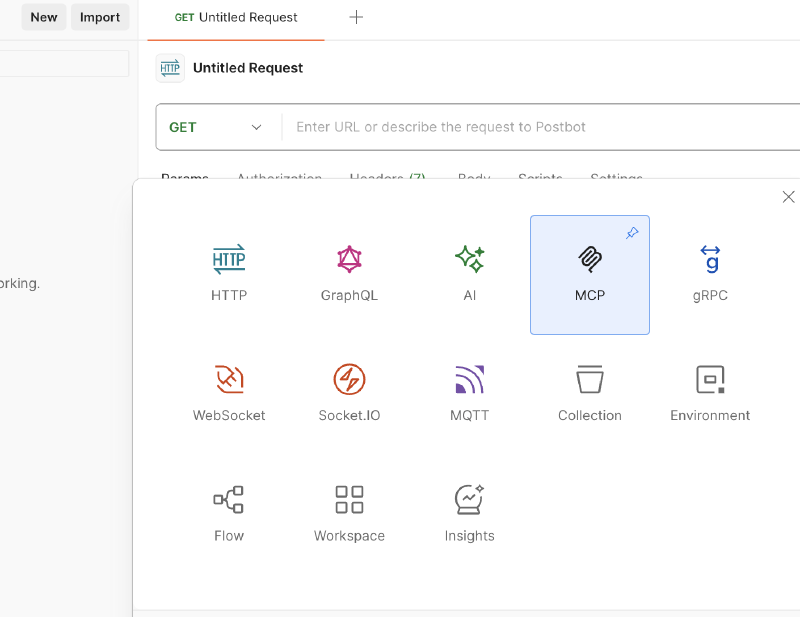
uv --directory /Users/wyang/Projects/2025/nasa_mcp/ run nasa_mcp_server.py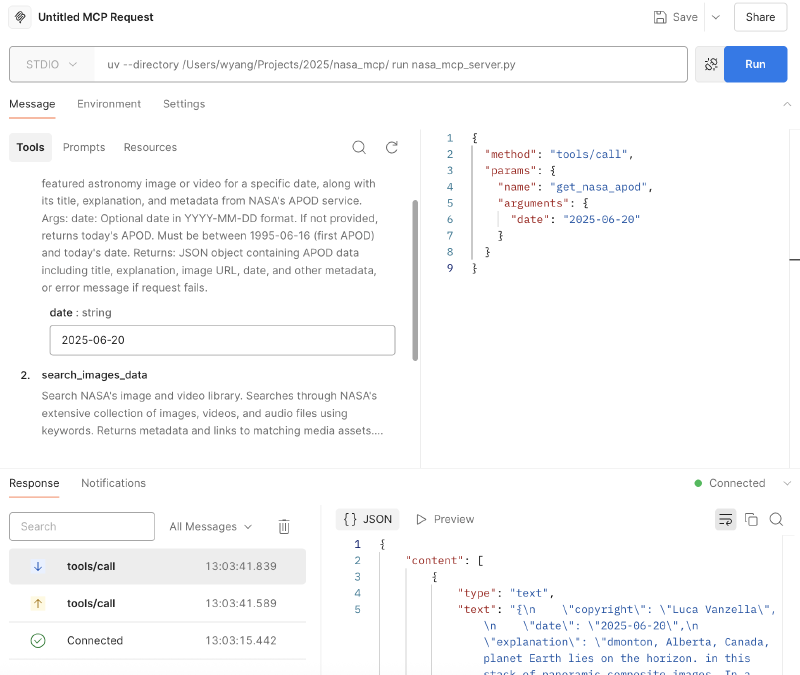
🥳 Whohoo~