I’ve been paying $15/month to host my personal website on Flywheel (WordPress) since 2021. It served me well for years. But over time, a few things started to bother me: the admin dashboard felt heavy for what was essentially a blog with a handful of posts, plugin updates kept piling up, and the writing experience for code-heavy posts never felt quite right.
I’d been thinking about rebuilding my website with more of a modern coder style: Markdown files that live in a git repo, writing in Obsidian, and updating via git commit. Before the coding agent era, the problems were time and effort — not sure if the effort spent on migrating a website was worth it: reformatting posts, fixing broken embeds, reorganizing images, debugging CSS, setting up deployment.
But post coding agent era, there’s no excuse not to at least try — or I mean, think and then delegate to my trusted collaborator: Claude Code (CC).
What We Did in an Afternoon #
Here’s the full scope of what got done in a single session:
1. Set Up Hugo with the Blowfish Theme #
I had already scaffolded a Hugo project with the Blowfish theme as a git submodule. Claude helped me configure the site — hugo.toml, params.toml, menus.en.toml, markup.toml — and get the basic structure right.
2. Reformatted All 11 Blog Posts #
This was the big one. When I exported my WordPress content to Markdown, the formatting came out mangled. Bullet lists became flat paragraphs. Inline code disappeared. Bold text got concatenated with surrounding words.
CC fetched the original WordPress pages via Playwright MCP server from my live site, compared them against the Hugo versions, and rewrote the Markdown for all 11 posts — preserving the original structure, restoring code blocks, and fixing list formatting. All in parallel.
3. Fixed Spotify Embeds #
My book notes post about Ryuichi Sakamoto had raw Spotify URLs that rendered as plain text in Hugo. Claude replaced them with proper iframe embeds.
4. Added Images to Posts #
I downloaded images for several posts — sketchnotes, book covers, screenshots. Claude placed them in the right page bundle folders and added the appropriate Markdown references.
5. Custom Tag Colors #
I wanted pastel blue and yellow alternating tag colors to match the site’s palette. This required a custom badge.html partial and some CSS targeting — and a fun debugging session when all tags showed the same color because nth-child was targeting the wrong element.
6. Rewrote the About Page #
This was the most fun part. I rewrote my bio and I wanted to create an animation to show my life journey so far. I did a sketch like below and prompted a separate Claude Cowork session to make the animation with earth as a globe.
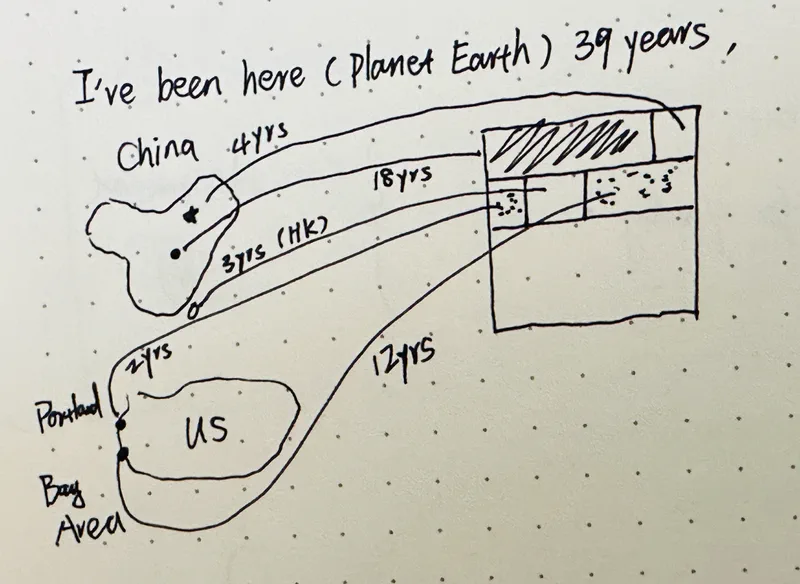
Claude helped me integrate a Three.js globe animation showing the five chapters of my life — Hunan, Beijing, Portland, Hong Kong, and the Bay Area. Each chapter is a glowing dot on a rotating Earth, connected by arcs. Below the globe, an 80-year grid shows each year as a small colored square. A quiet reminder of time.
The live age counter at the top of the page ticks every second. As I write this, it reads something like 39 years, 10 months, 24 days, 14 hours, 32 minutes, and 7 seconds.
7. Cleaned Up Navigation #
- Removed the internal YouTube page and redirected the nav link to my YouTube channel
- Added Stellar Diary — my astronomy observation journal
- Removed four posts that were originally published on Medium and didn’t have local images
8. Deployed to Cloudflare Pages #
The final step: push to GitHub, connect the repo to Cloudflare Pages, transfer nameservers from Hover to Cloudflare, and wait for DNS propagation. The whole deployment setup took about 15 minutes, and the site propagated across various locations shortly after. Now every git push to main auto-deploys the site.
The Stack #
| Before | After |
|---|---|
| WordPress | Hugo |
| Flywheel ($15/month) | Cloudflare Pages (free) |
| Web-based editor | Markdown in Obsidian |
| Plugin-based deploys | git push auto-deploys |
| MySQL database | Static files in a git repo |
What I Learned #
Claude Code is remarkably good at migration work. The tedious parts — comparing formatting between two versions of the same post, finding the right CSS selector, configuring TOML files — are exactly the kind of tasks where an AI pair programmer shines. It doesn’t get bored. It doesn’t skip steps. And it can run multiple fixes in parallel.
Static sites feel liberating. There’s something deeply satisfying about a website that’s just files in a folder. No database, no admin panel, no security patches. Just Markdown, HTML, and a build step.
The best time to migrate is now. Having Claude Code or any coding agent as a collaborator turned a daunting website migration project into an afternoon of conversations (or prompt sessions) while I drank tea and read my book.
The site you’re reading this on is the result. If you’re thinking about making a similar move — from WordPress to Hugo, or any static site generator — I hope this gives you a sense of what’s involved. It’s more manageable than you think, especially if you don’t do it alone.
Happy Year of the Horse, and happy building.